No description
- Swift 97.9%
- Shell 2.1%
| assets | ||
| scripts | ||
| Sources/iNetspeed | ||
| Package.swift | ||
| README.md | ||

iNetspeed
A lightweight native macOS menu bar app that monitors network speed in real time.


Features
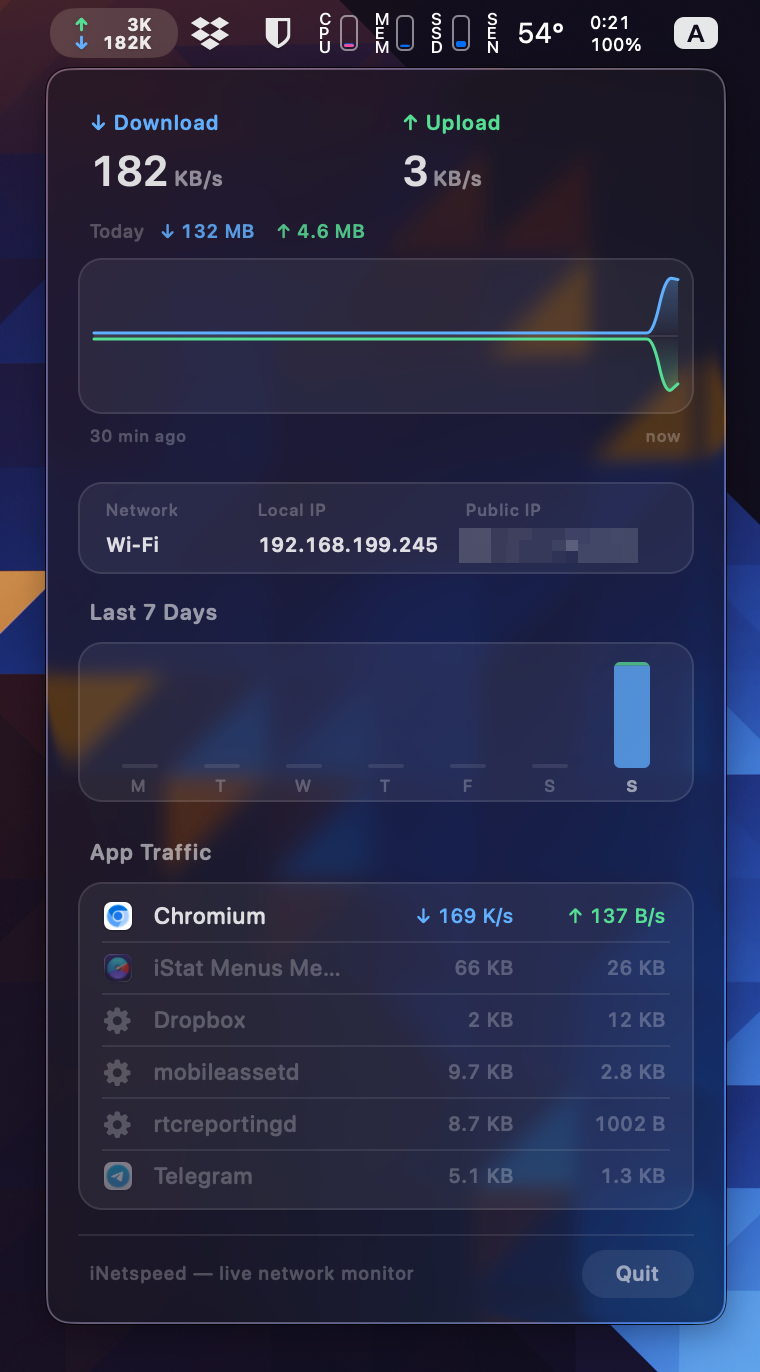
Menu bar display
- Live download and upload speed, updated every second
- Compact unit formatting (B, K, M, G) that fits the status bar
Summary panel
- Current download and upload speed with color-coded labels
- 30-minute speed history chart with smooth bezier curves
- Interactive chart — hover to see exact speeds at any point in time
- Subtle gridlines and time axis labels
Per-app traffic
- Top 6 apps by current network usage
- App icons with a gear fallback for system processes
- Proportional traffic volume bar per row using the system accent color
- Processes with no current traffic stay visible, dimmed, until evicted
- Chromium-style multi-process apps and apps with multiple independent root processes (e.g. Dropbox) are grouped into a single row
Requirements
- macOS 14 or newer
- Xcode command line tools or Xcode (for Swift Package Manager)
Run
swift run iNetspeed
Build
Release binary:
swift build -c release
Launchable .app bundle:
sh scripts/build-app.sh
open .build/iNetspeed.app
The app runs as an accessory and appears only in the menu bar — no Dock icon.
Implementation notes
- Network interface speeds are read directly from kernel counters via
getifaddrs— no polling overhead - Per-app traffic uses
nettop -x -n -L 1 -Pon a background thread with backpressure to avoid blocking the main actor - Process grouping walks the OS process tree via
sysctl(KERN_PROC_PID)to find the root app for each nettop entry, then does a secondary merge by resolved app name to handle apps with multiple independent root processes - Root PID and app name lookups are cached per nettop key and pruned each sample cycle to prevent stale PID reuse
- All views update in-place while the menu is open — no teardown and rebuild on each tick